by Vitaly, Sunday, December 13th, 2015
Web Proxy Checker Pro 1.7.44 released.
New Features
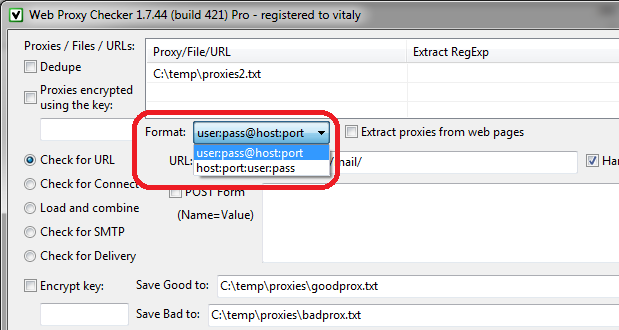
1. Format of the source lines: user:pass@host:port (default), host:port:user:pass.
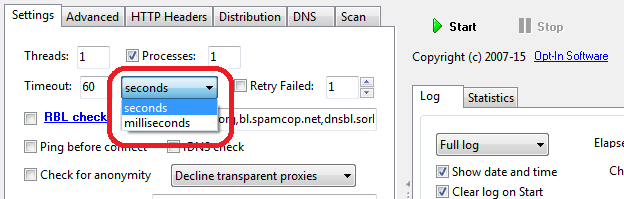
2. Timeout unit: seconds (default), milliseconds.
Tags: Proxy
Software, dvelopment, and practical insights
by Vitaly, Sunday, December 13th, 2015
Web Proxy Checker Pro 1.7.44 released.
New Features
1. Format of the source lines: user:pass@host:port (default), host:port:user:pass.
2. Timeout unit: seconds (default), milliseconds.
Tags: Proxy
by Vitaly, Wednesday, November 18th, 2015
Opt-In List Manager 1.1.66 has been released.
New feature “Skip Characters” has been added to “Extract And Clean” tool.
It allows to suppress invalid characters that may exist in the source file.
Specifying the range of the allowed characters:
a-zA-Za-zA-Z0-90-9`!@#$%^&*()_+|\-=\\{}\[\]:";'<>?,./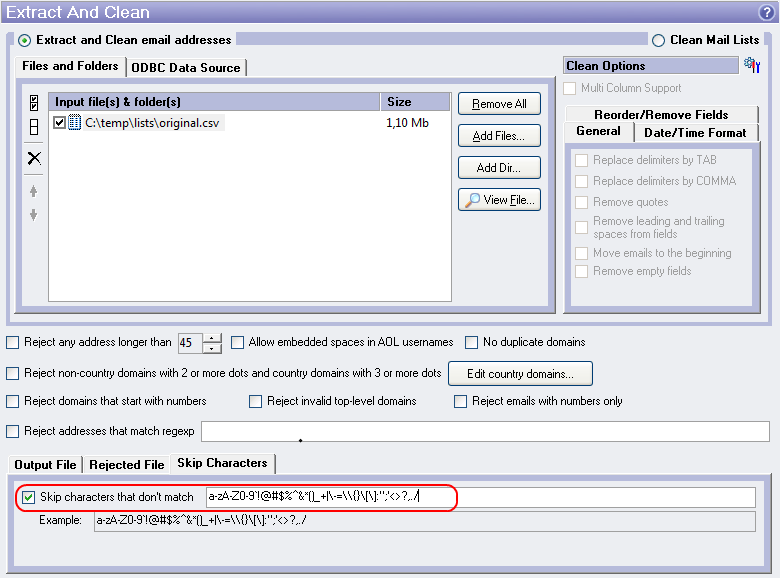
by Vitaly, Wednesday, December 9th, 2015
TCP Port Mapper 1.77 released.
New version supports options to connect via proxy:ConnectProxyHost, ConnectProxyPort, ConnectProxyMode, ConnectProxyUser, ConnectProxyPass.
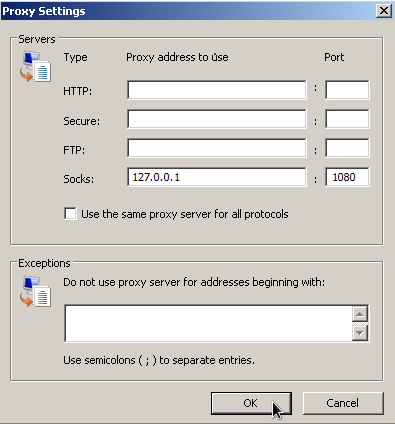
Example. Listen all SOCKS requests from a web browser or an application and forward the requests to Fiddler.
IE Internet Options->LAN Settings->Advanced->Proxy Settings:
portmapcfg.ini:
ListenPort=1080
ProxyMode=SOCKS4
ConnectProxyMode=CONNECT
ConnectProxyHost=127.0.0.1
ConnectProxyPort=8888
DNSHost=8.8.8.8
DNSPort=53
DNSHost2=8.8.4.4
DNSPort=53
More deatils: TCP Port Mapper Help.
by Vitaly, Wednesday, November 11th, 2015
Account Verifier 1.32 has been released.
Added “Extract URLs“ feature. It allows to extract links from email messages in the mailbox accessed using a POP3 protocol.
by Vitaly, Wednesday, November 11th, 2015
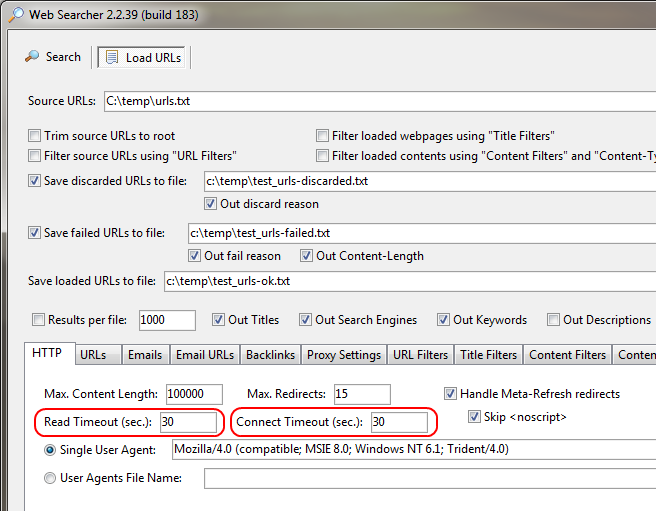
Web Searcher 2.2.39 has been released.
“Read Timeout” and “Connect Timeout” options added.
by Vitaly, Friday, July 31st, 2015
When TCP Port Mapper (tcpportmap) acts as a proxy (ProxyMode has one of the values: HTTP, CONNECT, SOCKS4 or SOCKS5), then MapToHost and MapToPort can be used to forward all traffic to the specifed host:port.
For example, let ProxyMode=CONNECT and TCP Port Mapper has received this command from the client:
CONNECT www.google.com:80 HTTP/1.1MapToHost=127.0.0.1, MapToPort=8080 then TCP Port Mapper will establish connection to 127.0.0.1:8080.MapToHost=127.0.0.1, MapToPort is not specified (or zero) then TCP Port Mapper will establish connection to 127.0.0.1:80.MapToHost is not specified (or empty), MapToPort=8080 then TCP Port Mapper will establish connection to www.google.com:8080.MapToHost and MapToPort are not specified then TCP Port Mapper will establish connection to www.google.com:80.by Vitaly, Thursday, July 30th, 2015
IMAP Checker 1.1 has been released.
This tool allows to count e-mails in the Inbox and Spam folders.
It uses IMAP protocol to access mailboxes and it has multi-threaded architecture.
On the IMAP Servers tab you need to fill in the IMAP settings for different e-mail domains.
Domain(s): aol.com, aol.co.ukHost: imap.aol.com
Port: 143
SSL/TLS: No SSL Support
Authentication Type: User/Password
Inbox Folder: INBOX
Spam Folder: SPAMDomain(s): gmail.com, googlemail.comHost: imap.gmail.com
Port: 993
SSL/TLS: Implicit SSL
Authentication Type: User/Password
Inbox Folder: Inbox
Spam Folder: [Gmail]/SpamDomain(s): hotmail.com, outlook.comHost: imap-mail.outlook.com
Port: 993
SSL/TLS: Implicit SSL
Authentication Type: User/Password
Inbox Folder: Inbox
Spam Folder: JunkDomain(s): yahoo.com, yahoo.co.ukHost: imap.mail.yahoo.com
Port: 993
SSL/TLS: Implicit SSL
Authentication Type: User/Password
Inbox Folder: Inbox
Spam Folder: Bulk MailTags: IMAP
by Vitaly, Friday, June 26th, 2015
TCP Port Mapper 1.70 released.
Now IPv6 addresses can be used in all settings: ListenIP, MapToHost, MapArray, MapFromFile, MapFromUrl etc.
It is preferred to enter IPv6 addresses, enclosed in square brackets. That allows to extract the Port from the IPv6:Port.
Example of the IPv6 address: [2001:4860:4860::8888].
If the ListenIP setting is not specified (or ListenIP=ANY) you can set SrvIPv6=Yes.
That allows to force listening incoming IPv6 connections.
If the both IPv4 and IPv6 addresses are exist for the destination host, TCP Port Mapper will use IPv4 address. To force using IPv6 address you can set: CntIPv6=Yes.
by Vitaly, Wednesday, July 1st, 2015
URL to resolve IPv4 address:
http://ipv4.test-ipv6.com/ip/?callback=_jqjsp&asn=1&testdomain=test-ipv6.com&testname=test_asn4Response (IPv4):
_jqjsp({"ip":"xxx.xxx.xxx.xxx","type":"ipv4","subtype":"","via":"","asn":"yyyyy","asn_name":"Provider Name,US","asnlist":"yyyyy","padding":""})Extract IPv4 regular expression:
\d{1,3}\.\d{1,3}\.\d{1,3}\.\d{1,3}URL to resolve IPv6 address:
http://ipv6.test-ipv6.com/ip/?callback=_jqjsp&asn=1&testdomain=test-ipv6.com&testname=test_asn6Response (IPv6):
_jqjsp({"ip":"xxxx:x:xxxx:xxx:xxxx:xxxx:xxxx:xxxx","type":"ipv6","subtype":"Teredo","via":"","padding":""})Extract IPv6 regular expression:
([0-9a-fA-F]{1,4}:){7,7}[0-9a-fA-F]{1,4}|([0-9a-fA-F]{1,4}:){1,7}:|([0-9a-fA-F]{1,4}:){1,6}:[0-9a-fA-F]{1,4}|([0-9a-fA-F]{1,4}:){1,5}(:[0-9a-fA-F]{1,4}){1,2}|([0-9a-fA-F]{1,4}:){1,4}(:[0-9a-fA-F]{1,4}){1,3}|([0-9a-fA-F]{1,4}:){1,3}(:[0-9a-fA-F]{1,4}){1,4}|([0-9a-fA-F]{1,4}:){1,2}(:[0-9a-fA-F]{1,4}){1,5}|[0-9a-fA-F]{1,4}:((:[0-9a-fA-F]{1,4}){1,6})|:((:[0-9a-fA-F]{1,4}){1,7}|:)Tags: External IP, IPv4, IPv6, Proxy
by Vitaly, Friday, June 12th, 2015
DNS Server 1.49 has been released.
Added the ability to send requests to the IPv6 DNS servers. Now DNSHost, DNSHost2 and FromIP settings can contain IPv6 addresses (read Help for more info).
Example (using Google IPv6 DNS):
DNSHost=2001:4860:4860::8888
DNSHost2=2001:4860:4860::8844
Added the ability to listen incoming DNS requests on IPv6. SrvIP and SrvIP2 settings can contain IPv6 addresses.
If SrvIP is not specified or it contains Any value then you can force using IPv6 by specifying:
SrvIPv6=Yes